

In this multi-part article, we’ll explore what it takes to build an effective data pipeline, from concept to code. As a case study, we’ll use one of my applications that captures data across an organization and ultimately creates visual, actionable business intelligence.
Why data pipelines are interesting
A data pipeline moves data to a destination, transforming it along the way, turning it into something useful.
It’s like a factory assembly line. But, imagine you’re assembling data. Raw data is your source material entering at one end. It goes through various processes and comes out the other end as finished product (clean, structured data ready to use).
For instance, air traffic control systems process data from multiple radar stations, transponders, weather sensors, and flight plan databases to build a real-time picture of airspace. A picture humans can interpret in a split second. An air traffic control system:
Ingests position data from hundreds of aircraft every few seconds.
Correlates radar returns with flight plans and transponder signals.
Filters out noise, birds and ground clutter.
Predicts flight paths and potential conflicts.
Integrates weather data to route around storms.
Handles sensor failures gracefully — if one source goes down, it seamlessly switches to backup sources.
Controllers need accurate data within seconds, and failures can have catastrophic consequences. They need real-time data, rather than batches, with real-time redundancy and validation.
Data pipelines are fundamental to modern data infrastructure. A good pipeline makes sure the right data gets to the right place at the right time, in the right format.
If you think about it — that’s the foundation of just about everything in our data-driven modern society.
When it comes to projects that will evolve your mastery over data management, building a data pipeline is one of the most challenging and rewarding. That’s why, in this multi-part series, I wanted to do a deep dive into a data pipeline — including design, architecture and code. In this series, we’ll get hands-on and explore how to build an app that analyzes complex streams of data.
If you’re new, welcome to Customer Obsessed Engineering! Every week I publish a new article, direct to your mailbox if you’re a subscriber. As a free subscriber you can read about half of every article, plus all of my free articles.
Anytime you’d like to read more, you can upgrade to a paid subscription.
Creating actionable intelligence from data
Data pipelines start with raw source data — from wearables, instrumentation, monitors, databases, and mobile devices. An Airbus A380 has up to 25,000 individual sensors. Each one sends raw data that may need to be acted on quickly. That raw data goes through different processes — cleaning, filtering, combining, reformatting — before landing in its final destination, which might be an instrument, display, data warehouse, analytics tool, or application.
Clearly, copying and interpreting all that data by hand is impossible. Instead, the data pipeline does it automatically, often as a real-time feed that transforms information on the fly. It ensures data moves reliably and consistently.
Raw data is often messy or in the wrong format. The pipeline transforms it into something useful — removing duplicates, standardizing formats, calculating metrics, or joining information from multiple sources, as in the air traffic control example.
Often, data pipelines are event driven. This just means they consume a sequence of events from the real world — some fact that already happened — then turn it into actionable intelligence.
“Actionable intelligence” just means some kind of information you can use. For instance, the fact that a stock price dropped could be turned into an automated buy order for that stock. An e-commerce company might have a pipeline that pulls daily sales data from its sales database, combines it with inventory data, calculates key metrics like revenue per product, and loads everything into a dashboard where executives can see performance at a glance.
There are a lot of moving pieces. Getting those pieces to work together, then correlating all that disparate data and presenting it clearly, logically, is hard. There are challenges to doing it well, which I’ll talk about below.
Preserving data integrity
One of the most important things a good data analysis tool — and data pipeline — needs is a guarantee of data integrity. In this case, data integrity means the data is exactly the data we think we are analyzing. This sounds obvious, but it’s surprisingly easy to get wrong.
Here are some common pitfalls, all of which we need to design against:
Silent data loss: Information dropped during joins, filtering, or transformations without warning. For example, only capturing summary data or a subset of available data instead of recording (and keeping) everything.
Type coercion errors: Numbers becoming strings, dates and time zones handled incorrectly, or precision lost in conversions.
Encoding issues: Data corruption caused when moving between systems — something as simple as assuming an input field uses Latin characters instead of Unicode.
Partial updates: Only processing some records, possibly ignoring “uninteresting data,” or failing to capture records that don’t process correctly.
Implicit assumptions: Null handling, unexpected data volume, unexpected inputs or missing parameters, duplicate treatment, or sort order that changes behavior unexpectedly.
Good data pipelines preserve integrity.
In the second article in this series we’ll dive deep into data pipeline architecture and address each of these potential pitfalls.
Annotating data
We also need a way to evolve our data over time — that is, add to it without breaking our data integrity rules.
Raw data rarely speaks for itself. A transaction table tells you what happened, but not why. A spike in errors shows something broke, but not what you were doing at the time. Good data tools let you add context and turn numbers into understanding.
Annotations work at multiple levels. At the record or event level, they document what the data represents, adding fidelity. A data analyst might add a “review” tag to what looks like an accidental double-entry, or a prescription drug regulatory pipeline might link together other drugs that treat similar symptoms.
At the macro level, annotation can build on a core data set, adding new information. Data from multiple sources can be combined to create a more complete picture. Hard-to-perform calculations can be run and attached to existing data, making it easy to extract more meaning later. Later, in our example use case, we’ll do this by annotating our data set for further exploration.
Annotations compound over time. Six months later, when someone investigates why something looks unusual, annotations lead to new institutional knowledge. Without them, context can be lost and every new analyst has to rediscover what happened.
Surfacing insight
Data analysis tools should surface insights, not just tables and charts. The difference between data and intelligence is whether it changes what you do next.
We need the right level of aggregation and annotation: too granular and patterns disappear in noise; too macro and you can’t identify root causes.
Start by focusing on decisions. Before building a dashboard, a report or a graph, ask what decision it will inform. If the answer is vague or simply, “it’s good to know,” it’s not actionable. Every result should express some clear, specific action.
Actionable intelligence changes what you do next.
Make the analysis do the work, not the reader. Instead of showing a table of conversion rates by channel, highlight which channels are underperforming, by how much and why. Instead of a trend line, show whether or not execution is deviating from planned goals and exactly how it changes your delivery plan.
Focus on metrics that lead to human action. Also, tune thresholds to minimize false positives. For example, it may be useful to “clean” a data set by removing anomalies and peculiar outliers. We’ll do that in our example app, effectively removing data that is suspicious and likely just “noise.”
The goal is to inform clear action. If it requires tribal knowledge, domain expertise, further exploration or twenty minutes of interpretation, it’s not yet actionable.
“Rewinding” history
One of the most powerful and underused capabilities in data analytics is the ability to reprocess historical data with new logic. When you fix a bug in your analysis or refine a calculation, you often want to know: “what would the last three months have looked like with this new logic?”
This is harder than it sounds. If your pipeline only processes new data, historical numbers are frozen with old limitations or bugs. You end up with charts where the methodology changes partway through, making trends impossible to interpret. “Revenue increased 20% in March,” but we’ll never know if it was growth or if it was due to a changed calculation.
Point-in-time correctness makes this possible: storing raw events or source data permanently, without changing it or pre-processing it. When you need to revise analysis, reprocess the historical data through the updated pipeline. The results of that processing becomes annotation to the data — ultimately, annotations that we can throw out and do again using a new approach. We look at data as an entire time series, a record of facts that happened in the past — and are, therefore, immutable.
But this means treating our analysis and transformation logic as code, not ad-hoc formulas or manual actions. The source data must never be altered — only our code, and the annotations and analysis it produces. That gives us a documented data model, not tribal knowledge about which column means what. The goal is reproducibility: given raw data from any date and a specific version of your data pipeline, you can create an exact analysis for any timeframe.
Building a data pipeline
I promised a deep dive into the design, architecture and code of a data pipeline. There are a lot of use cases — stock trade analysis, weather data, genomic research, geologic tremor research, the list is probably endless.
For this deep dive, we’ll explore an application that tracks team activity across all the projects an organization is working on. Our goal in tracking this information is to deliver new business intelligence that provides useful, actionable insights into team efficiency across the organization.
We’ll build the application in stages, showing its evolution and developing a solid foundation for a data pipeline.
Using the app, team members will track their activities across various tasks, but unlike most “time trackers,” they’ll be able to annotate their DOWNTIME. This captures effort that’s leaking away from the team — essentially, “activity I had to do that didn’t contribute direct value.”
We’ll scale this up across an entire organization. For a large organization, that means hundreds of teams, thousands of team members and tens of thousands of individual tasks. It’s a sizeable volume of data to work with, but in terms of what data pipelines are capable of, it’s still pretty small (think about the volume of data flowing through the stock market, in comparison).
We’ll need a way for team members to capture day-to-day work, quickly and easily. This will become our data source, pushing data into the pipeline in real-time:
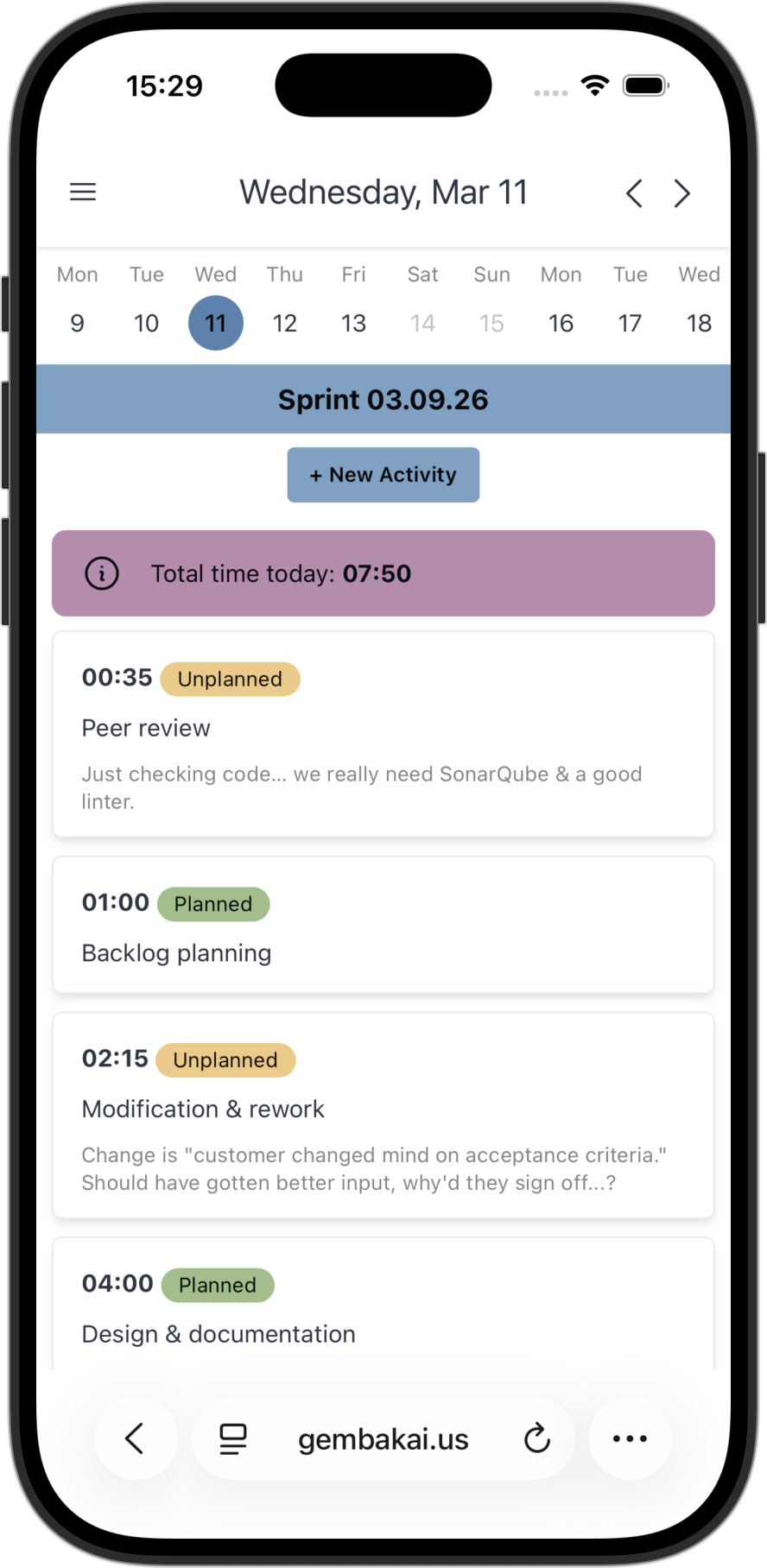
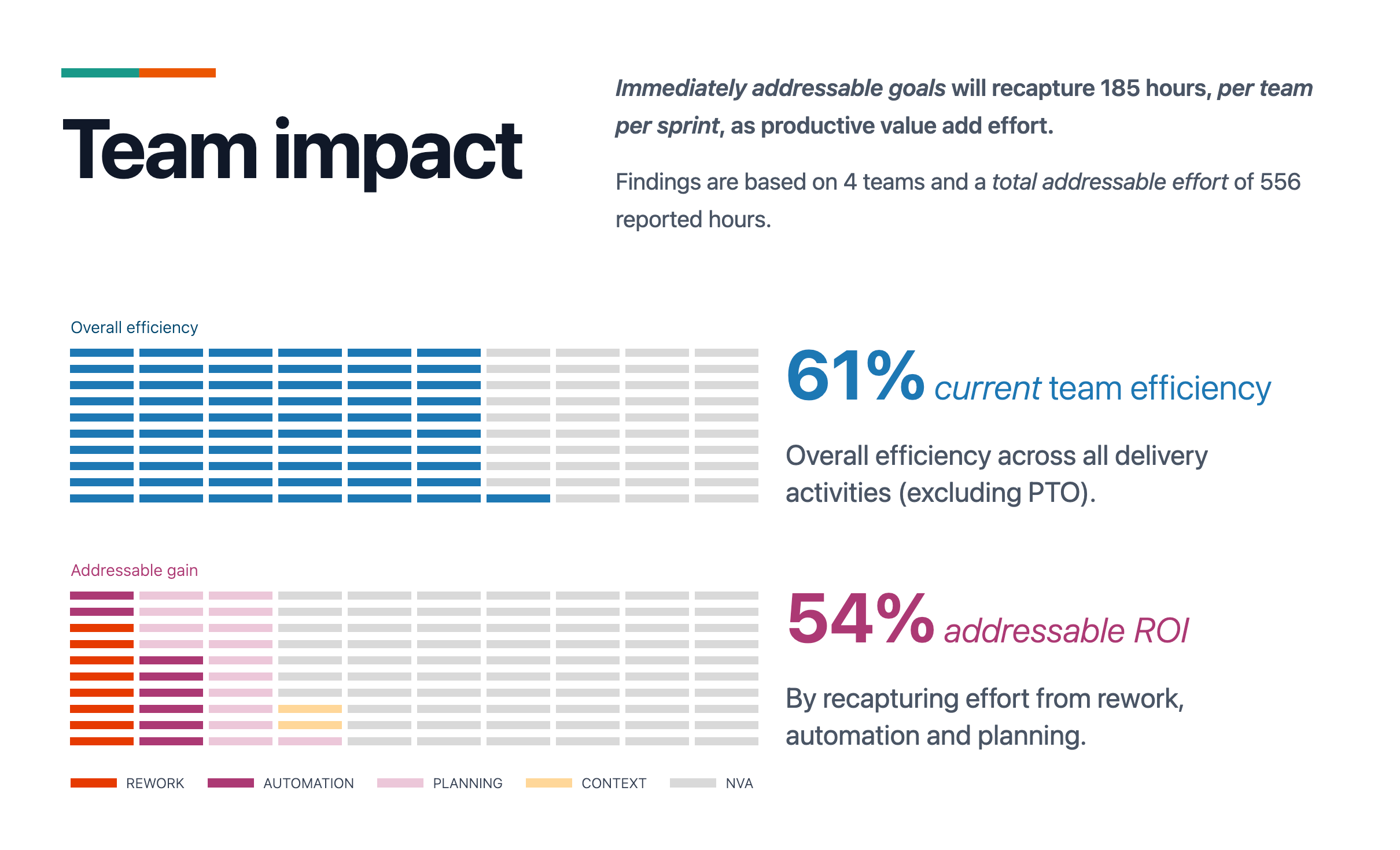
All the activities will flow into our data pipeline. We’ll capture those individual activities, but we need to look at the data in aggregate — from an organizational point of view. This means being able to annotate and analyze the data from different perspectives.
Looking at the data as a stream of events over time, we can “slice and dice” it. We can also compose the data with other analyses, all to produce actionable intelligence. That means being able to aggregate the data and run on-the-fly analysis across different segments of data (for example, being able to take a “slice” of data across four teams out of the entire organization):
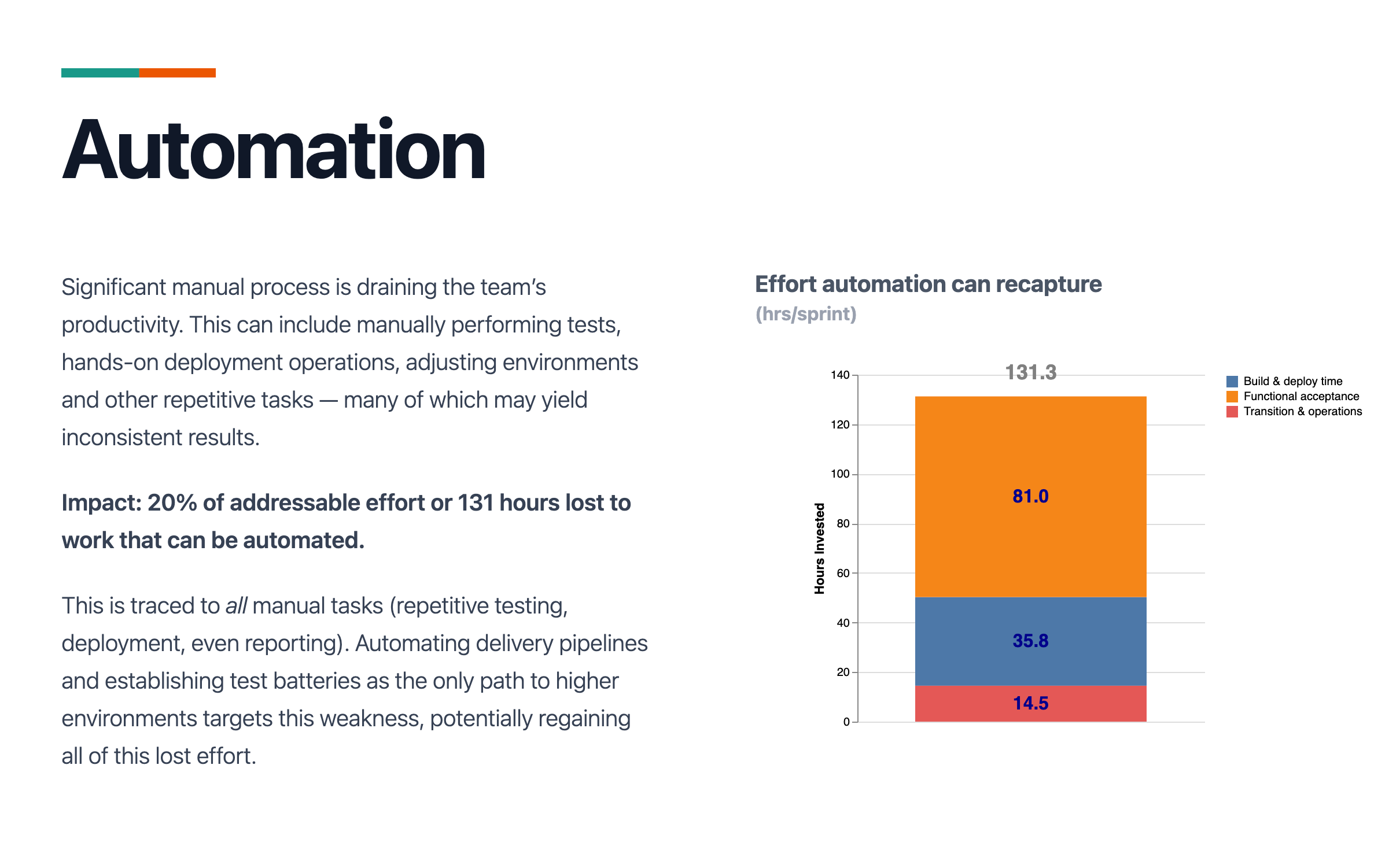
We also want to perform detailed analysis. In our activity tracking app, we’ll show time the team spent on manual activity that could have been completely automated — letting the humans on the team spend their brain power on more valuable tasks:
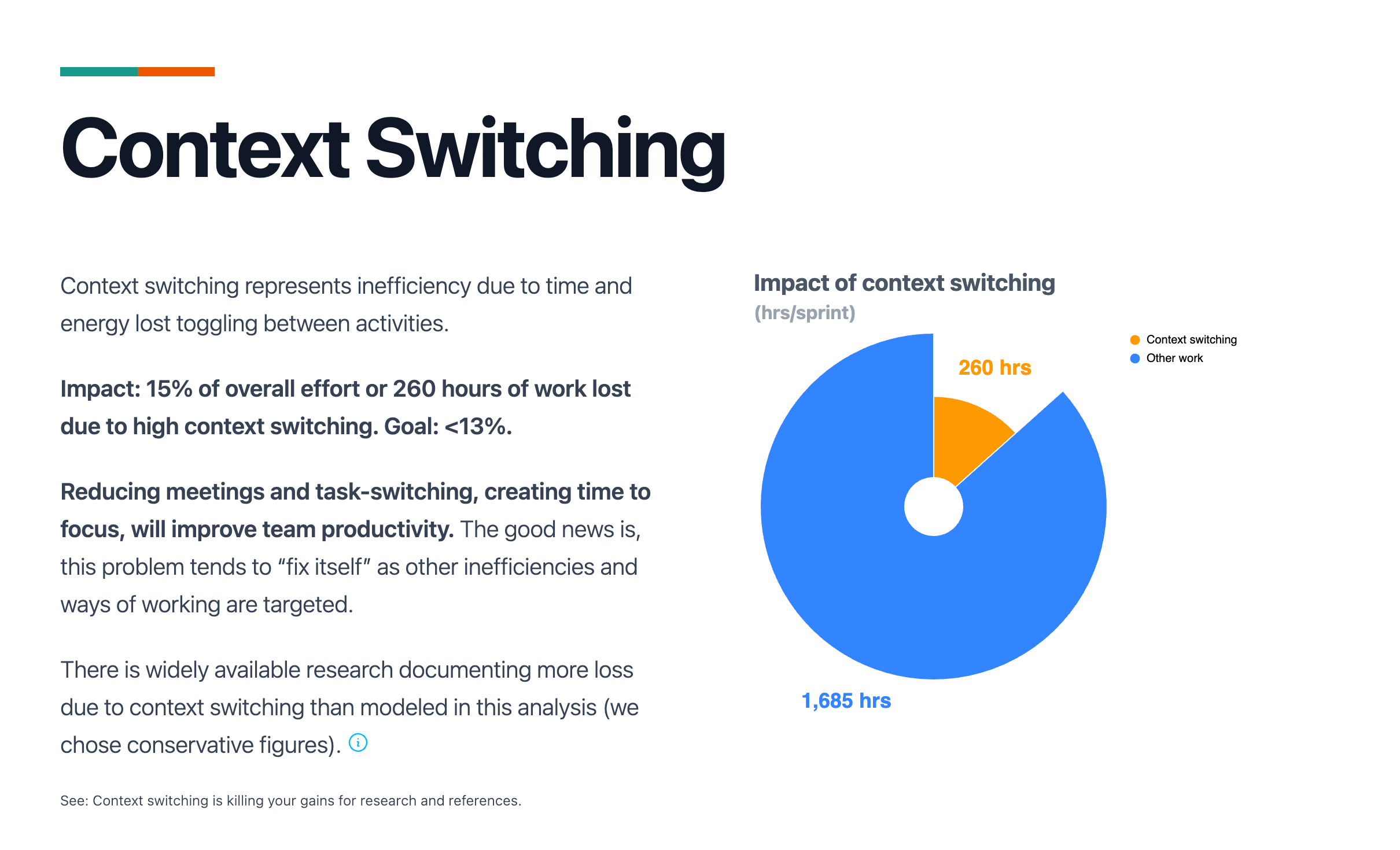
As we discussed above, a good analytics platform also supports annotation — that is, being able to combine new data with existing data.
In our case, we’ll calculate how much time is lost to switching from one task to another. We’ll combine that analysis with pre-existing data to create new insights. Here we show the impact of giving the team more focus time:
Summarizing our goals
From a business perspective what we want to achieve with the activity tracking app doesn’t seem complicated:
Give team members a place to easily and quickly record their activities (what they did, how long it took).
Let them tag effort that leaks away into DOWNTIME — activities that, while potentially necessary, didn’t really contribute direct value or move their goals forward.
Aggregate data across the entire organization to discover meaningful trends.
Expose action that we can take — action that will have an immediate impact on efficiency, productivity — improving “ways of working” across teams.
This is something that most organizations are working on — in fact, most are working on efficiency and productivity goals right now.
But the reality is, it’s complicated. There are competing concerns, unclear cross-organizational goals, a lot of noise to filter out, activity that may be necessary but might not seem necessary. How do we accurately analyze and filter it down into clear, actionable intelligence?
There are solutions. Ideas built on decades of rich, scientific research and business process evolution. Perhaps most famously, Toyota empowered their employees to do whatever it took to streamline automotive production lines. Toyota’s concepts regarding just in time production are deeply embedded in the foundations of Lean Manufacturing. Taiichi Ohno is widely regarded as having pioneered effective techniques for eliminating “wasteful action” in day-to-day work (Muda, a Japanese word meaning “wasteful”).12
Our application will build on that, gathering activity data and turning it into an actionable, live stream of insight about organizational health.
We’ll need to stay true to the critical concerns outlined in this article: preserve data integrity, focus on annotation not transformation, build a system that always delivers actionable intelligence and, perhaps most important, make it possible to “rewind and replay.” As our algorithms evolve and mature, we’ll want those insights to be applied retroactively.
Hey, can I ask a favor? Referrals keep this publication alive. Please take a moment to send this article to a friend.
Coming next
We’ve outlined our requirements above. Next up is defining the architecture, the “blueprinting” phase. That’ll be the topic of the next article in this series. By the end of the third article, we’ll have a concrete roadmap and an architectural foundation — a steel thread that we can build on to deliver a proof of concept in one or two iterations of work.
If you’re following along in the Delivery Playbook, we’ve just about finished our mobilization phase. We’ve got a product vision and we know what the product’s capabilities and functions will be.
And if you’re more interested in tracking DOWNTIME and improving your team’s “ways of working,” check out GembaKai.


If you find Customer Obsessed Engineering and the Delivery Playbook valuable, please share it with your friends and coworkers.
Nawras Skhmot, What Is Lean?, The Lean Way Blog, Aug. 5, 2007.
See: Context switching is killing your gains (part 2), Jan. 30, 2023.